<!DOCTYPE html>
<html lang="en">

<head>
    <meta charset="UTF-8">
    <meta name="viewport" content="width=device-width, initial-scale=1.0">
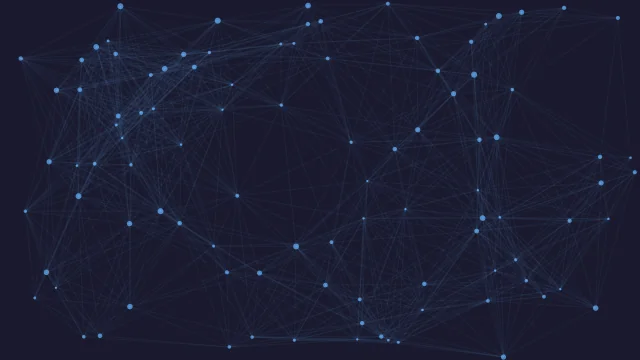
    <title>Quantum Node Mesh</title>
    <style>
        body {
            margin: 0;
            overflow: hidden;
            background-color: #0b0f19;
            font-family: sans-serif;
        }

        canvas {
            display: block;
            width: 100vw;
            height: 100vh;
        }
    </style>
</head>

<body>
    <canvas id="quantumCanvas"></canvas>

    <script>
        const canvas = document.getElementById('quantumCanvas');
        const ctx = canvas.getContext('2d', { alpha: false });

        let width, height;
        let particles = [];

        // Configuration
        const config = {
            particleCount: 150,
            baseColor: '#00e5ff',
            accentColor: '#bd00ff',
            connectionDistance: 130,
            mouseRadius: 180,
            speed: 1.0
        };

        let mouse = { x: -1000, y: -1000 };

        function resize() {
            width = canvas.width = window.innerWidth;
            height = canvas.height = window.innerHeight;
        }

        class Particle {
            constructor() {
                this.x = Math.random() * width;
                this.y = Math.random() * height;
                this.vx = (Math.random() - 0.5) * 1.5 * config.speed;
                this.vy = (Math.random() - 0.5) * 1.5 * config.speed;
                this.radius = Math.random() * 2 + 1;
                this.isAccent = Math.random() > 0.8;
            }

            update() {
                this.x += this.vx;
                this.y += this.vy;

                // Bounce off edges
                if (this.x < 0 || this.x > width) this.vx *= -1;
                if (this.y < 0 || this.y > height) this.vy *= -1;

                // Mouse interaction (elastic repulsion)
                const dx = mouse.x - this.x;
                const dy = mouse.y - this.y;
                const dist = Math.sqrt(dx * dx + dy * dy);

                if (dist < config.mouseRadius) {
                    const force = (config.mouseRadius - dist) / config.mouseRadius;
                    this.x -= dx * force * 0.05;
                    this.y -= dy * force * 0.05;
                }
            }

            draw() {
                ctx.beginPath();
                ctx.arc(this.x, this.y, this.radius, 0, Math.PI * 2);
                ctx.fillStyle = this.isAccent ? config.accentColor : config.baseColor;
                ctx.fill();
            }
        }

        function init() {
            resize();
            particles = [];
            let count = window.innerWidth < 768 ? config.particleCount / 2 : config.particleCount;
            for (let i = 0; i < count; i++) {
                particles.push(new Particle());
            }
        }

        function animate() {
            ctx.fillStyle = '#0b0f19';
            ctx.fillRect(0, 0, width, height);

            ctx.lineWidth = 1;

            for (let i = 0; i < particles.length; i++) {
                particles[i].update();
                particles[i].draw();

                for (let j = i + 1; j < particles.length; j++) {
                    const dx = particles[i].x - particles[j].x;
                    const dy = particles[i].y - particles[j].y;
                    const dist = Math.sqrt(dx * dx + dy * dy);

                    if (dist < config.connectionDistance) {
                        ctx.beginPath();
                        ctx.strokeStyle = particles[i].isAccent
                            ? `${config.accentColor}${Math.floor((1 - dist / config.connectionDistance) * 255).toString(16).padStart(2, '0')}`
                            : `${config.baseColor}${Math.floor((1 - dist / config.connectionDistance) * 255).toString(16).padStart(2, '0')}`;
                        ctx.moveTo(particles[i].x, particles[i].y);
                        ctx.lineTo(particles[j].x, particles[j].y);
                        ctx.stroke();
                    }
                }
            }
            requestAnimationFrame(animate);
        }

        window.addEventListener('resize', () => {
            resize();
            if (particles.length === 0) init();
        });

        window.addEventListener('mousemove', (e) => {
            mouse.x = e.clientX;
            mouse.y = e.clientY;
        });

        window.addEventListener('mouseout', () => {
            mouse.x = -1000;
            mouse.y = -1000;
        });

        window.addEventListener('touchmove', (e) => {
            mouse.x = e.touches[0].clientX;
            mouse.y = e.touches[0].clientY;
        });

        init();
        animate();
    </script>
</body>

</html>
<canvas id="quantumCanvas"></canvas>
body {
            margin: 0;
            overflow: hidden;
            background-color: #0b0f19;
            font-family: sans-serif;
        }

        canvas {
            display: block;
            width: 100vw;
            height: 100vh;
        }
const canvas = document.getElementById('quantumCanvas');
        const ctx = canvas.getContext('2d', { alpha: false });

        let width, height;
        let particles = [];

        // Configuration
        const config = {
            particleCount: 150,
            baseColor: '#00e5ff',
            accentColor: '#bd00ff',
            connectionDistance: 130,
            mouseRadius: 180,
            speed: 1.0
        };

        let mouse = { x: -1000, y: -1000 };

        function resize() {
            width = canvas.width = window.innerWidth;
            height = canvas.height = window.innerHeight;
        }

        class Particle {
            constructor() {
                this.x = Math.random() * width;
                this.y = Math.random() * height;
                this.vx = (Math.random() - 0.5) * 1.5 * config.speed;
                this.vy = (Math.random() - 0.5) * 1.5 * config.speed;
                this.radius = Math.random() * 2 + 1;
                this.isAccent = Math.random() > 0.8;
            }

            update() {
                this.x += this.vx;
                this.y += this.vy;

                // Bounce off edges
                if (this.x < 0 || this.x > width) this.vx *= -1;
                if (this.y < 0 || this.y > height) this.vy *= -1;

                // Mouse interaction (elastic repulsion)
                const dx = mouse.x - this.x;
                const dy = mouse.y - this.y;
                const dist = Math.sqrt(dx * dx + dy * dy);

                if (dist < config.mouseRadius) {
                    const force = (config.mouseRadius - dist) / config.mouseRadius;
                    this.x -= dx * force * 0.05;
                    this.y -= dy * force * 0.05;
                }
            }

            draw() {
                ctx.beginPath();
                ctx.arc(this.x, this.y, this.radius, 0, Math.PI * 2);
                ctx.fillStyle = this.isAccent ? config.accentColor : config.baseColor;
                ctx.fill();
            }
        }

        function init() {
            resize();
            particles = [];
            let count = window.innerWidth < 768 ? config.particleCount / 2 : config.particleCount;
            for (let i = 0; i < count; i++) {
                particles.push(new Particle());
            }
        }

        function animate() {
            ctx.fillStyle = '#0b0f19';
            ctx.fillRect(0, 0, width, height);

            ctx.lineWidth = 1;

            for (let i = 0; i < particles.length; i++) {
                particles[i].update();
                particles[i].draw();

                for (let j = i + 1; j < particles.length; j++) {
                    const dx = particles[i].x - particles[j].x;
                    const dy = particles[i].y - particles[j].y;
                    const dist = Math.sqrt(dx * dx + dy * dy);

                    if (dist < config.connectionDistance) {
                        ctx.beginPath();
                        ctx.strokeStyle = particles[i].isAccent
                            ? `${config.accentColor}${Math.floor((1 - dist / config.connectionDistance) * 255).toString(16).padStart(2, '0')}`
                            : `${config.baseColor}${Math.floor((1 - dist / config.connectionDistance) * 255).toString(16).padStart(2, '0')}`;
                        ctx.moveTo(particles[i].x, particles[i].y);
                        ctx.lineTo(particles[j].x, particles[j].y);
                        ctx.stroke();
                    }
                }
            }
            requestAnimationFrame(animate);
        }

        window.addEventListener('resize', () => {
            resize();
            if (particles.length === 0) init();
        });

        window.addEventListener('mousemove', (e) => {
            mouse.x = e.clientX;
            mouse.y = e.clientY;
        });

        window.addEventListener('mouseout', () => {
            mouse.x = -1000;
            mouse.y = -1000;
        });

        window.addEventListener('touchmove', (e) => {
            mouse.x = e.touches[0].clientX;
            mouse.y = e.touches[0].clientY;
        });

        init();
        animate();